LogoNewFace
Models
Skills
Features
AI Image GeneratorAI Video GeneratorVideo to AudioVideo Subtitle RemoverProduct Detail PageAI TikTok Ads GeneratorAI UGC Video CreatorAI Video Ad GeneratorReal Estate Video AdsAI YouTube Shorts MakerAI UGC Video GeneratorUGC Product AdsGoogle Ads UGC VideoSkincare Video AdsSkincare UGC VideosWomen's Fashion AdsCosmetics Video AdsDTC Product VideosWomen's Fashion UGCSkincare Meta AdsCosmetic TikTok AdsLuxury Jewelry ShowcaseAthleisure Video AdsHome & Kitchen Video AdsPet Brand UGC AdsWellness Video AdsTech & Gadget VideosSustainable Product AdsFitness Equipment AdsMeta Fashion AdsHigh-Converting SkincareLuxury Jewelry ReelsCosmetic Brand VisualsTech Gadget ExplainersPet Brand TikTok AdsWellness PromosMeta Ads for DTCSustainable Product PromosHome & Kitchen AdsCosmetics UGC AdsLuxury Jewelry AdsEcommerce Visual AssetsReal Estate AI AvatarsAdgenesis AlternativeArcade AI AlternativeCreative AI for AdsChatGPT AdsAI Commercial MakerDigital Ad ChannelsVideo Ad MockupsAI Ad Analytics WorkflowFitness Product VideosHigh-Converting DTC AdsAI Actor Video GeneratorAI Actors for Video AdsIcon AI for Ad DesignUGC Videos for DTC BrandsFashion Promo VideosAI Ad MakerAI Advertising GuideMeta Ads for Luxury JewelryFashion Product ShowcaseCinematic Skincare ReelsAI Avatar GeneratorAI Ad GeneratorAI Video Ad Maker PricingTikTok Ads for FitnessVideo Ads for Women's FashionSkincare Brand VisualsFitness Explainer VideosAI Commercial MakerAI Coke Ad Case StudyProduct Ads Best PracticesPet Brand AdsAI Avatar MobileCreator Icon UGCAI Meta Ads For CosmeticsBest UGC Video Creation Software for Live EventsAI Advertising NewsAd IconsAI TikTok Ads For Sustainable ProductsAI TikTok Ads For Wellness BrandsAI TikTok Ads For Luxury JewelryAI UGC Videos For Athleisure WearAI UGC Videos for Home & KitchenAI UGC Videos for Gadgets & TechAI UGC Videos For Sustainable ProductsAI UGC Videos For Fitness EquipmentAI UGC Videos For Luxury JewelryAI Product Videos For CosmeticsAI Product Videos For Women's FashionAI Product Videos For Home & KitchenAI Product Videos For Sustainable ProductsAI Product Videos For Athleisure WearAI Product Showcase For SkincareAI Product Showcase For CosmeticsAI Product Showcase for Sustainable ProductsAI High-Converting Ads For Women's FashionAI High-Converting Ads for Home & KitchenAI Cinematic Reels For Women's FashionAI Brand Visuals for Women's FashionAI Brand Visuals For DTC BrandsAI Aesthetic Promos For SkincareAI Aesthetic Promos for CosmeticsAI Aesthetic Promos For Women's FashionAI Explainer Videos For Wellness BrandsAI Explainer Videos For DTC BrandsAI Promo Videos For SkincareAI Promo Videos For CosmeticsAI Promo Videos For Pet BrandsAI Promo Videos for Gadgets & TechAI Promo Videos For Home & KitchenAI Meta Ads For Pet BrandsAI Meta Ads for Athleisure WearAI Meta Ads For Gadgets & TechAI Meta Ads For Fitness EquipmentAI Meta Ads For Sustainable ProductsAI Meta Ads For Wellness BrandsOpenAI Ads News: What Marketers Need to KnowArc Canvas AlternativeAI Meta Ads For Home & Kitchen
Compare
Remake
PricingPlugin
Blog
POV in Film & AI VideoFirst Five PromptsWhat AI Video Is (and Isn't)What Is a Jump Cut?What Is an Establishing Shot?What Is a Dutch Angle?What Is a Match Cut?What Is a Dolly Shot?What Is Cross-Cutting?Direct a Scene With No ActorsAI Crypto Video GeneratorFaceless Crypto VideosCrypto YouTube IdeasBuy Crypto SafelyWhat Is BitcoinEthereum ExplainedBlockchain GuideNFTs DecodedCrypto Wallets GuideWhat Is DeFiWhat Is Web3Stake Crypto GuideMeme Coins GuideSpot Crypto ScamsBitcoin Halving GuideMake & Sell NFTsCrypto Tax GuideCentral Bank Digital CurrenciesWhat Are DAOsAI YouTube Video GeneratorOnline Learning PlatformsFaceless Educational VideosEarly Childhood EducationLearning Disabilities GuideTest Prep: SAT, ACT, GRESTEM Education YouTubeScholarships & Financial AidStudy Abroad GuideStartup Marketing StrategiesBusiness Law EssentialsFaceless Fitness VideosEntrepreneur Success StoriesProduct Pricing TipsWhy Startups FailBusiness Model CanvasUnique Value PropositionBusiness Networking GuideBootstrap Online BusinessStartup to Scaleup GrowthTeacher Training GuideMontessori Education GuideFaceless Entrepreneurship VideosExplainer & Tutorial VideosVideo Quality & Audio GuideStarting Business with No MoneyFuture of Education GuideTraditional vs Modern TeachingEducational Psychology YouTube GuideSpecial Education Inclusive LearningTutoring: Find or Become a TutorAdult Education YouTube GuideEducational Technology ToolsVocational Training Skills EducationTrading Risk ManagementCommon Investing Mistakes GuideDo Automated Trading Bots Work?YouTube AI Marketing Video GeneratorYouTube Marketing Channel IdeasDigital Marketing 101 GuideSocial Media Marketing Strategy 2026Facebook Ads Tutorial for BeginnersEmail Marketing List Growth GuideGoogle Ads for Profitable CampaignsInstagram Marketing Brand BuildingTikTok Marketing: Reaching Gen Z AudiencesAI Video Ads Platform: Complete GuideAI Ads for Agents: Ultimate Guide 2026Best Marketing Automation Agency 2026TikTok AI Video Ads: Ultimate Guide 2026AI Generated Commercials: Definitive Guide 2026UGC Ads: Ultimate Guide to AI-Powered Ads 2026How to Write a Camera Ad Script That Sells 2026Google AI Ads: Complete Guide 2026Character AI Ads: Complete Guide 2026AI Avatar Tools for E-Commerce Ads 20262026 Advertisement That Works: Step-by-Step GuideCreative Ads That Convert 2026Advertising Creative Guide 2026AI Avatar & Royalty-Free Music Guide 2026Batch Social Video Ads Platforms 2026Promoting Products: Digital Ads & Swag 2026Media Buying Platforms 2026: A–Z DSP ComparisonMeta AI Lead Gen Ads 2026 GuideBest Ad Creative for SaaS 2026Best UGC Testimonial Video Software 2026Top 12 AI UGC Video Tools 2026Top AI Platforms for UGC Brand VideosBest UGC Video Software for Google AdsBest UGC Video Makers for YouTube ShortsBest AI Avatar Solutions for UGC Product Ads 2026Retail Ad Builder Software 2026 Guide

Language

AI UGC Creator for Ecommerce Video Ads

Turn product photos and selling points into short, creator-style videos with NewFace. Test different hooks and product demos, refine the scenes that need work, and use your ad results to write a better brief for a UGC creator.

Try it with the Agent

Start with a product brief, or add your own product photos and selling points.

Describe your product and the UGC-style video you want…

Learn

What is a UGC creator?

A UGC creator makes content for brands in the style of everyday social posts, such as unboxings, product demos, and firsthand reviews. Brands can commission that content for their own social channels or ads. An AI UGC creator like NewFace generates creator-style videos from product assets and a brief. Use generated videos to explore how to show a product, and work with a human creator when you want someone to film how they actually use it.

Your workflow

Make creator-style videos from product photos

Give the NewFace Agent your product images, key selling points, audience, and intended placement. The Agent can develop a script and generate visuals in the same project.

Make creator-style videos from product photos

Give the NewFace Agent your product images, key selling points, audience, and intended placement. Ask for a first-person product demo, an unboxing, or a problem-and-solution ad. The Agent can develop a script and generate visuals and video in the same project. Use the visual canvas to review the storyboard, change a reference, or adjust a video prompt before generating another take. For a product that needs to be seen in action, brief the moment that makes the benefit clear. A packing cube ad could open with a suitcase that will barely close, then cut to a close-up of the compression zipper. Give the Agent a clear product reference so you can check details like the zipper, fabric, and logo against the original.
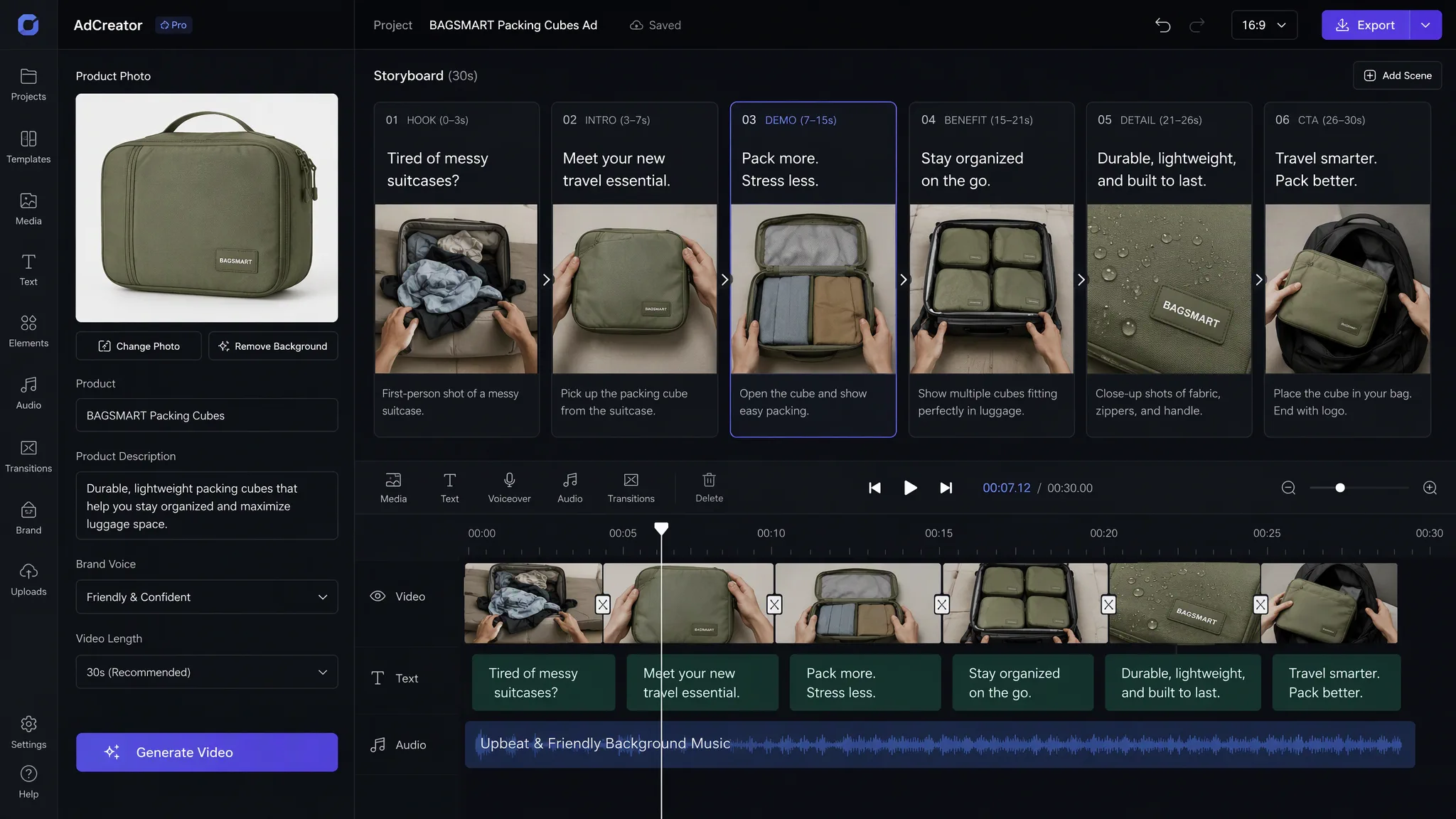
A product photo transforming into a creator-style video ad on a visual canvas, showing the storyboard and generated scenes
Illustrative image

Test up to 10 short product videos in one batch

Use Batch Product Video to generate up to 10 short videos per run. Start with one product and explore different hooks, selling points, or situations. If you already have a promising concept, keep the product, main benefit, and call to action consistent while you test different openings. That gives you a clearer read on which opening is worth developing. For the packing cube, you could test a suitcase that will barely close, a side-by-side view of clothes before and after compression, or a close-up of the zipper doing the work. Review the scripts before generating, then compare the finished videos in your ad platform. Use early watch time to assess the opening and your campaign's conversion data to decide which angle to pursue.
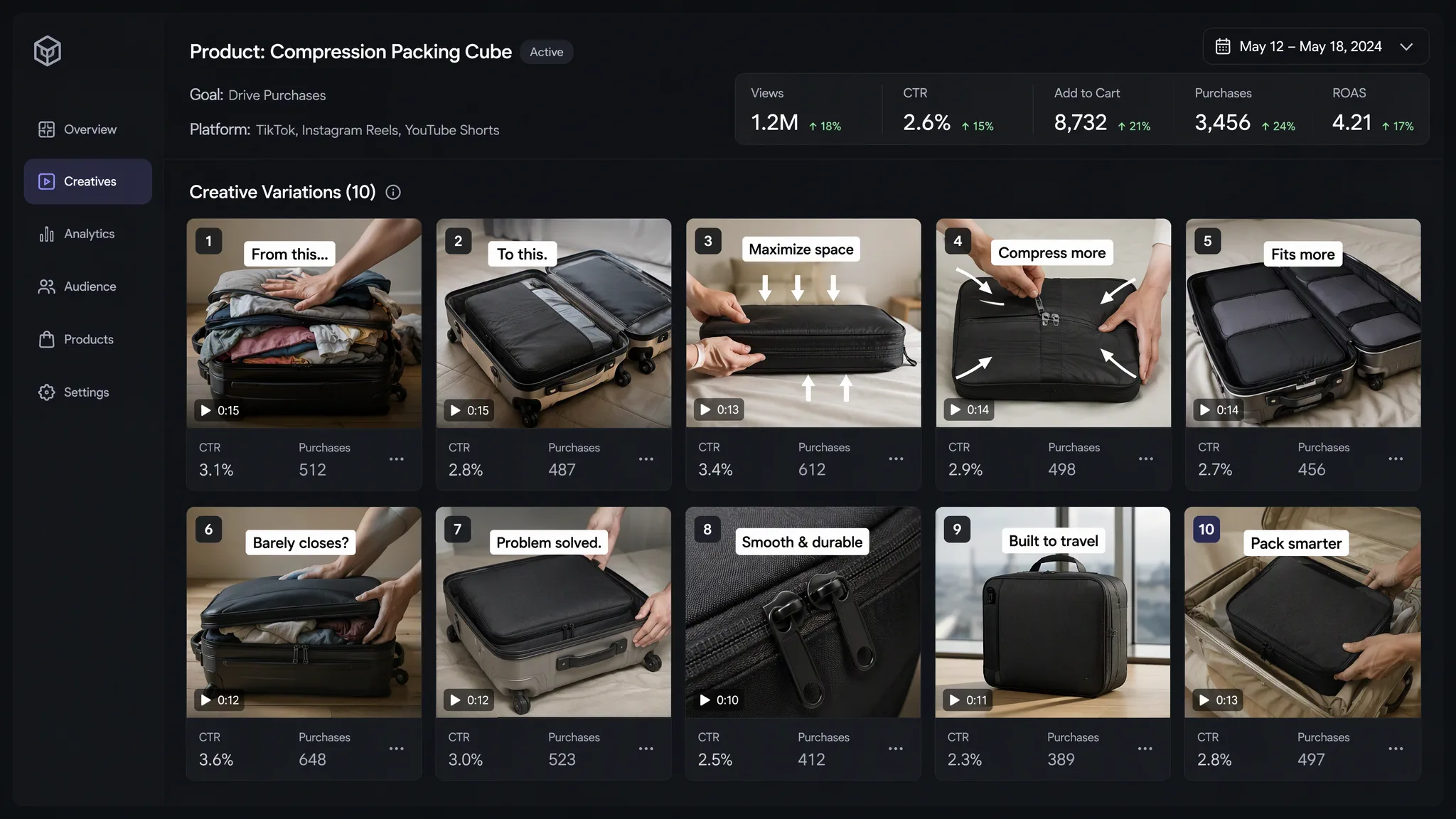
A grid of 10 short product video variations showing different hooks and angles for the same packing cube product
Illustrative image

Adapt a reference and revise individual scenes

Give Viral Remake a reference video you have permission to use, your product images, and a prompt. Inspired Mode takes cues from the reference's structure, such as how it opens or when it reveals the product, and generates new visuals from your brief. On the canvas, you can revise a storyboard shot, swap a reference image, or regenerate an individual clip in a multi-clip workflow. If the opening works but the product close-up needs a clearer view, focus the next generation on that clip. For a new market, specify the target language and adapt the setting or wording to fit how customers there would use the product. Review the product details and phrasing before publishing.
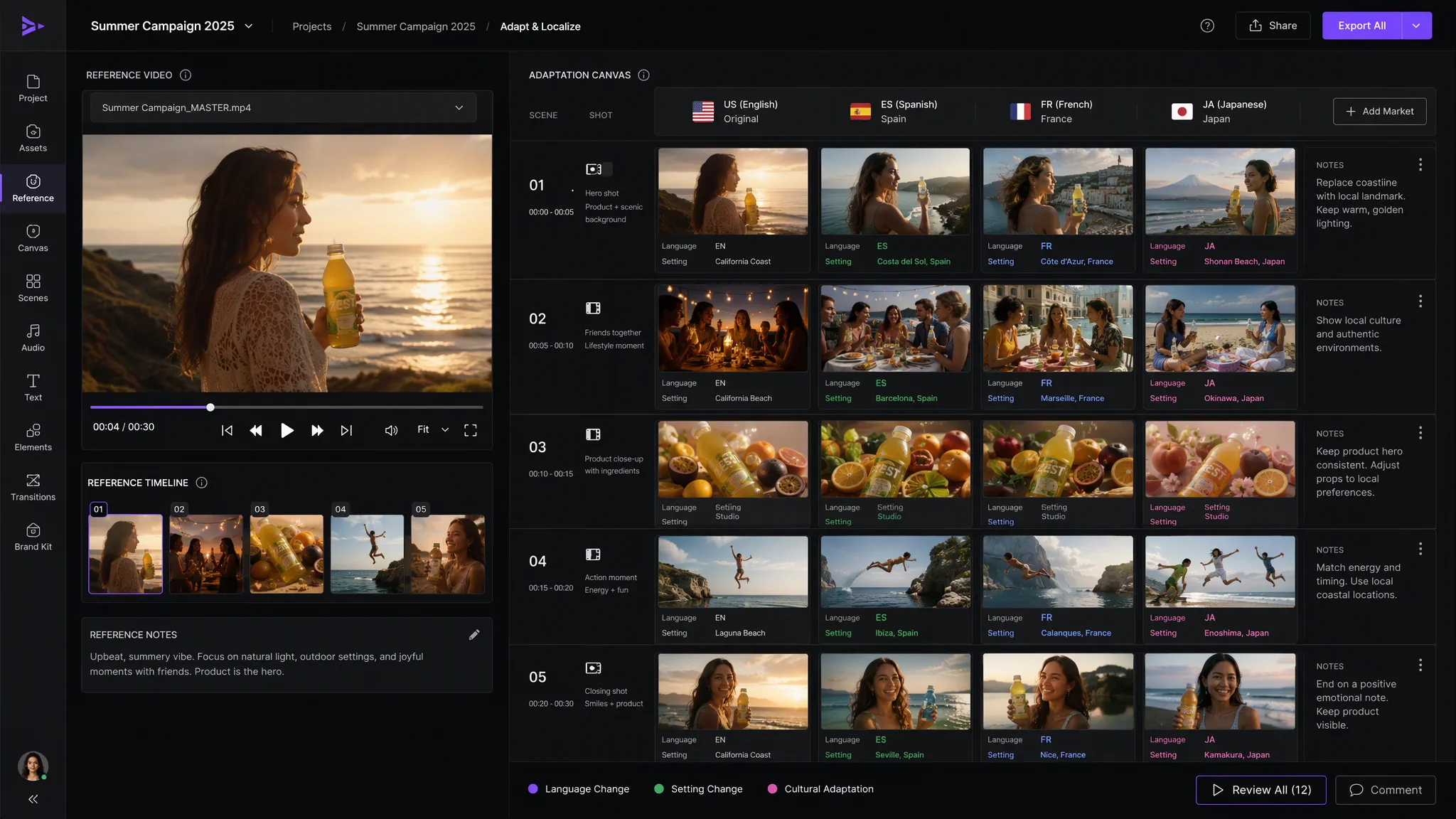
A reference video being adapted on a canvas with generated scenes, showing a storyboard with replaced clips for different markets
Illustrative image

Turn ad results into a brief for your UGC creator

Send your creator the opening that held attention, the product benefit you want to show, and any shots they need to capture. For example, if the zipper close-up performed best in your packing cube test, ask the creator to film that action while packing for a real trip. Give them room to describe what they actually noticed in their own words. Use AI-generated demos for creative tests and real creator footage for firsthand experiences. Get permission before reusing a creator's footage or likeness, and apply any required AI or sponsorship disclosures for the placement.
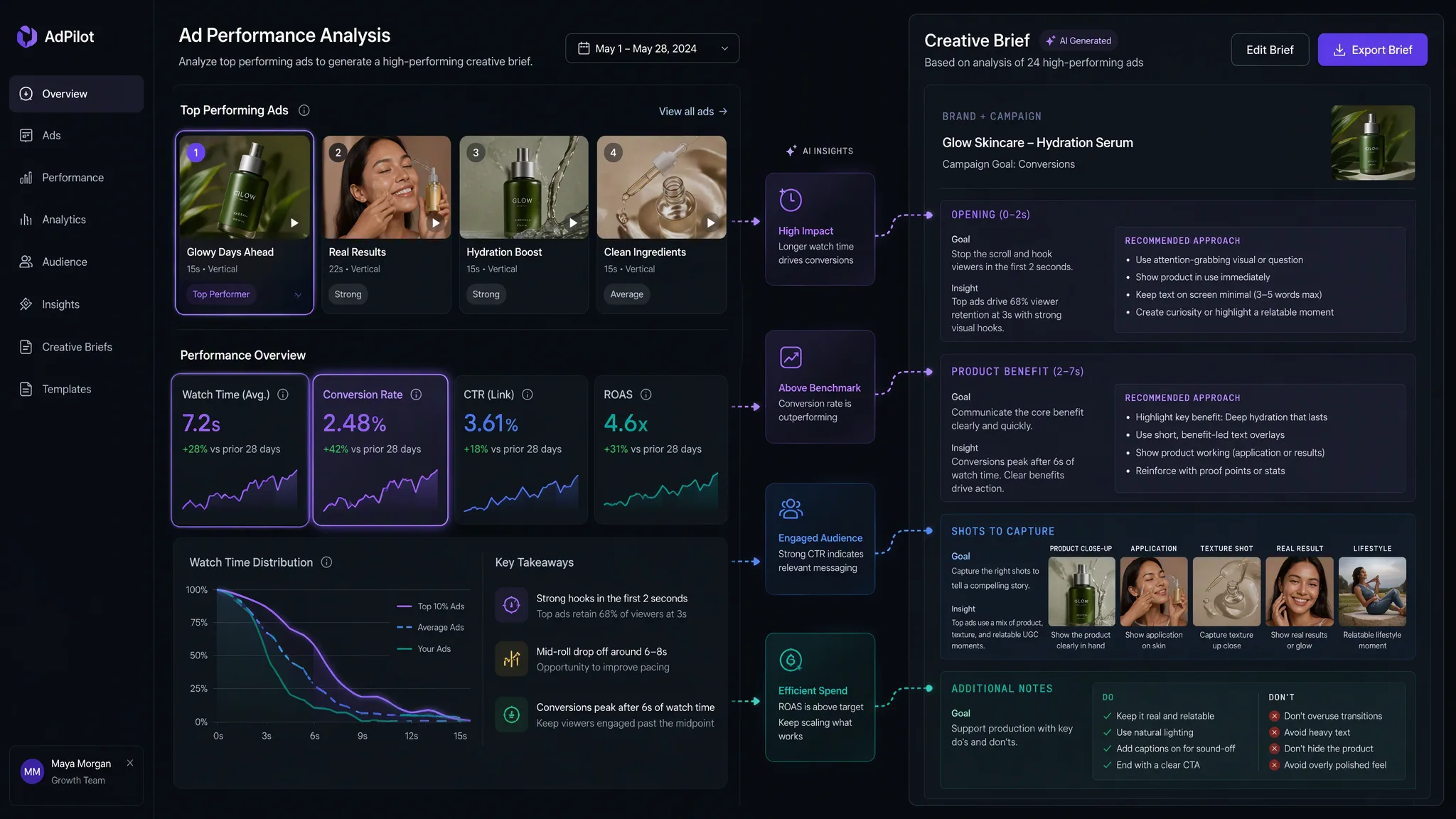
A creative brief being assembled from ad performance data, with highlighted metrics feeding into a creator brief template
Illustrative image

From product to video

How to create a UGC-style video with NewFace

Upload a product photo, write a short brief, review the script, and generate. Four steps to a creator-style video you can test in your ad platform.

01

Upload your product photos

Include a clear view of the product and any detail the video should show. The Agent uses these images as references to keep the product accurate throughout the generated video.

02

Write a short brief

Add the audience, one main benefit, target language, and intended placement. For TikTok, Instagram Reels, or YouTube Shorts, ask for a vertical 9:16 video. The more specific the brief, the closer the result.

03

Review the script and generate

Start with one concept or use Batch Product Video to explore several. Check the product, claims, and framing before sharing the output. Revise the storyboard on the canvas if a shot needs adjustment.

04

Test the clips and carry forward what works

Use the results to plan the next batch or give a human creator a more specific brief. If one opening held attention, use that insight for the next round of creative tests.

Good to know

Frequently asked questions

Do I need a finished script to use NewFace?

You can start with product photos, selling points, and a short brief. The Agent can draft a script from those inputs, and you can revise the storyboard on the canvas before generating video.

How many UGC-style videos can I generate at once?

The Batch Product Video Skill supports up to 10 short product videos per run. The workflow takes product images, selling points, a target duration, and the number of videos you want.

Can I use my existing creator videos as references?

Yes, when you have permission to use them. Viral Remake can take cues from a reference video's hook, pacing, and shot sequence. Choose Inspired Mode to use the structure as a starting point and generate new visuals for your product.

Can I create videos for different markets?

Specify the target language and market in your brief. You can also request changes to the setting, examples, or wording so the localized version fits the audience. Review each version for natural phrasing and accurate product claims before publishing.

Your first UGC-style video starts here

Create your first UGC-style product video

Start with one product, one selling point, and a scene that shows it. Generate a first take, then try a different opening for your next version.